

What is HTTP
The HTTP (Hypertext Transfer Protocol) is an application-level protocol for distributed, collaborative, hypermedia information systems. HTTP is used to deliver data between web servers and web clients, HTTP is a TCP/IP protocol which means that it’s a reliable protocol. It guarantees that your data will not be damaged in transit. The default HTTP port is TCP “80”, but other ports can be used as well.
How HTTP Works
Once you enter a web address ( http://www.linuxpathfinder.com ) in your web browser (Firefox, Chrome, etc), the HTTP fetches information from the web server (Apache HTTP) and responses back that requested web page to the client (Firefox). Once upon a time, “http://” needed to be before any web address to tell the browser that you use http protocol but these days you don’t need to write “http://” because the web clients become smarter enough to understand that you mean http when you type a web page address as “http://www.linuxpathfinder.com”, the web browser sends an HTTP request to the web server that stores linuxpathfinder.com files, the web server tries to find the desired object (“index.html”) and if the web server finds the object, web server sends the object to the client in an HTTP response, along with the type of the object (in this case, HTML format), the length of the object and other information which we will talk about soon.
Web Resources
Web resource is the source of web content, web resource could be static files such as html, pdf, jpeg and mp4, dynamic content which generates on the fly such as stock prices, weather and news. Dynamic contents are usually data that updated frequently or data retrieved from databases upon your request.
Uniform Resource Identifier (URI)
I believe that you know the purpose of postal addresses, right? You can go to your destination by knowing the postal address of the destination. The same concept happened on the Internet, to browse any web site (your destination), you need to know its address (postal address) and we call this address URI (Uniform Resource Identifier). Here’s a URI for an image resource on linuxpathfinder.com web server http://www.linuxpathfinder.com/logo.png
Uniform Resource Locator (URL)
Uniform Resource Locator (URL), commonly informally termed a web address. URL describe the specific location of a web resource on a server. A URL has two main components
– Protocol identifier: For the URL http://www.linuxpathfinder.com, the protocol identifier is http.
– Resource name: For the URL http://www.linuxpathfinder.com/images/logo.png, the resource name is “logo.png”
Media Types (MIME)
Web Servers attach a MIME type to all HTTP object data. When a web browser gets an object back from a server, it looks at the associated MIME type to see if it knows how to handle the object. Most browsers can handle hundreds of popular object types: displaying image files, parsing and formatting HTML files, playing audio files through the computer’s speakers, or launching external plug-in software to handle special formats.
You can check the complete list of MIME types from https://www.sitepoint.com/web-foundations/mime-types-complete-list/
HTTP Request Methods
HTTP defines a set of request methods to indicate the desired action to be performed for a given resource. The method tells the server what action to perform, this action could retrieve a web page or delete a file.
Method and Description
GET Used to retrieve information from the given server using a given URL. GET retrieve data only and don’t have other effect on the data
HEAD Same as GET, but transfers the status line and header section only without the response body
POST Used to submit data to be processed to a specified resource
PUT Replaces all current representations of the target resource with the uploaded content
DELETE Removes all current representations of the target resource given by a URL
CONNECT Establishes a tunnel to the server identified by a given URL
OPTIONS Describes the communication options for the target resource
HTTP Status Codes
Every HTTP response message comes back with a status code. The status code is a three-digit numeric code that tells the client if the request succeeded or if other actions are required. Understanding the HTTP Status Codes help you to troubleshoot the web server.
Status Code Description
200 Success, Document Returned correctly
301 The requested page has moved to a new url
404 The server cannot find the requested page
500 The requested was not completed, the server me an unexpected condition
For full HTTP status codes, please visit “https://httpstatuses.com/”
Httpstatus.com is an easy to reference database of HTTP Status Codes with their definitions and helpful code references all in one place.
HTTP Protocol Versions
There are several versions of the HTTP protocol, currently HTTP/1.1 is the most widely used http protocol, the new HTTP/2 was published in February 2015 and someday it will replace the HTTP/1.1, here’s a list of HTTP Protocol Versions
– HTTP/0.9
HTTP/0.9 supports only GET method, and it doesn’t support MIME types, HTTP headers or version numbers
– HTTP/1.0
HTTP/1.0 added version numbers, HTTP headers, additional methods and multimedia object handling. HTTP/1.0 made it practical to support graphically appealing web pages and interactive forms.
– HTTP/1.1
HTTP/1.1 focused on correcting architectural flaws in the design of HTTP, specifying semantics, introducing significant performance optimizations and removing mis-features
-HTTP/2.0
HTTP/2 is a replacement for how HTTP is expressed “on the wire.” It is not a ground-up rewrite of the protocol; HTTP methods, status codes and semantics are the same, and it should be possible to use the same APIs as HTTP/1.x (possibly with some small additions) to represent the protocol. The focus of the protocol is on performance; specifically, end-user perceived latency, network and server resource usage. One major goal is to allow the use of a single connection from browsers to a Web site.
Apache Web Server (Apache HTTP Server)
Apache is the most widely used web server software. Developed and maintained by Apache Software Foundation, Apache is an open source software available for free, it runs on 43% of all webservers in the world. Apache is fast, reliable and secure. It can be highly customized to meet the needs of many different environments by using extensions and modules.
1. Advantages of Apache Web Server
Apache Web Server has many advantages, we will focus on the top advantages such as
– Price
Apache Web Server is a free open source software , which means it is available for anyone to download and user at no cost.
– Features
Apache is a powerful Web server program with features that compare to its high-priced competitors. The software includes an administration control panel, customizable error messages and authentication schemes. The virtual hosting module allows you to run multiple websites from the same server.
– Compatibility
Apache is compatible with numerous hardware configurations and operating systems. It runs on Linux, Windows NT, MacOS, Unix and many other systems. Each installation can be tweaked to suit the technical capabilities of your hardware. Apache includes support for programming languages such as PHP, Perl and Python, among many others, along with SSL and TSL encryption for websites that require elevated security.
Note: I don’t recommend to use apache web server on production under Windows, MacOS. You still can use Apache under Windows, MacOS for development and test purposes.
– Community Support
Technical support resources for Apache are available on multiple websites around the world. This allows server owners to access reference articles and live help whenever necessary. This gives Apache a major advantage over programs that only have a company website as a source of support. When a new bug is found, the open source user community typically creates a patch to fix it and posts the solution for free on forums and social media websites.
2. How Apache HTTP Works?
Apache’s main role is all about communication over networks, and it uses the TCP/IP protocol, The Apache server is set up to run through configuration files, in which directives are added to control its behavior. In its idle state, Apache listens to the IP addresses identified in its config file. Whenever it receives a request, it analyzes the headers, applies the rules specified for it in the Config file, and takes action. One server can host many websites, not just one – though, to the outside world, they seem separate from one another. To achieve this, every one of those websites has to be assigned a different name, even if those all map eventually to the same machine. This is accomplished by using what is known as virtual hosts.
3. Apache HTTP Server versions
The current version of Apache HTTP server is 2.4 which is better than the previous version (2.2). The new release improved the performance with different Multi-Processing Modules (MPMs) available in Apache 2.4, Administrators can fine-tune Apache to be faster.
First we will update system with yum update command.
yum updateUpdating process has been completed. Let’s install Apache Web server.
yum install httpdStart Apache Server
systemctl start httpdStatus Apache Server
systemctl status httpd
● httpd.service - The Apache HTTP Server
   Loaded: loaded (/usr/lib/systemd/system/httpd.service; disabled; vendor preset: disabled)
   Active: active (running) since Mon 2018-09-24 07:13:00 EDT; 21min ago
     Docs: man:httpd(8)
           man:apachectl(8)
 Main PID: 986 (httpd)
   Status: "Total requests: 19; Current requests/sec: 0; Current traffic:   0 B/sec"
   CGroup: /system.slice/httpd.service
           ├─ 986 /usr/sbin/httpd -DFOREGROUND
           ├─2183 /usr/sbin/httpd -DFOREGROUND

Sep 24 07:12:53 localhost.localdomain systemd[1]: Starting The Apache HTTP Server...
Sep 24 07:12:58 localhost.localdomain httpd[986]: AH00558: httpd: Could not reliably determine the server's fully qualified domain name, using localhost.localdomain. Set the 'ServerName' directive globally to suppress this message
Sep 24 07:13:00 localhost.localdomain systemd[1]: Started The Apache HTTP Server.
Enable Apache Server
You can see in Apache status command httpd.service is disabled that means Apache service will not start automatically at startup. To enable it we will use it with following command.
systemctl enable httpd
Created symlink from /etc/systemd/system/multi-user.target.wants/httpd.service to /usr/lib/systemd/system/httpd.service.

systemctl status httpd
● httpd.service - The Apache HTTP Server
   Loaded: loaded (/usr/lib/systemd/system/httpd.service; enabled; vendor preset: disabled)
   Active: active (running) since Mon 2018-09-24 07:13:00 EDT; 41min ago
Configure the Firewall Service
Apache page will not open on browser until you allow http and https ports on firewall. We will allow apache ports with the following commands.
firewall-cmd --permanent --add-service=http
success
firewall-cmd --permanent --add-service=https
success
firewall-cmd --reload
success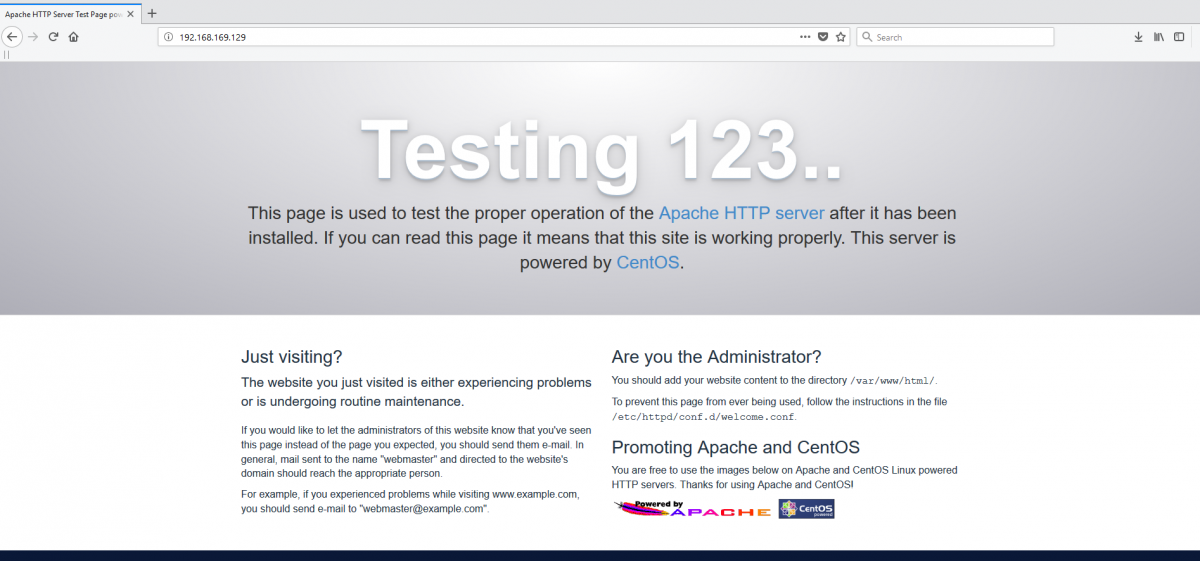
Apache Web Page Response
Where is Apache?
This command will tell us how to find a location and which apache is installed.
whereis httpd
httpd: /usr/sbin/httpd /usr/lib64/httpd /etc/httpd /usr/share/httpd /usr/share/man/man8/httpd.8.gz
Further you may explore Apache Web server with Linux man command and official website Apache HTTP Server Documentation as well.
man httpdhttps://httpd.apache.org/docs/
The equivalent walkthrough using yum directly is here: installing Apache with yum on Linux.


