Nagios® Core™ is an Open Source system and network monitoring application. Nagios monitors hosts and services that you specify, alerting you when things go bad and when they get better. Nagios Core originally designed to run under Linux.
Nagios Features
Some of the many features of Nagios Core include:
Monitoring of network services (SMTP, POP3, HTTP, NNTP, PING, etc.)
Monitoring of host resources (processor load, disk usage, etc.)
Simple plugin design that allows users to easily develop their own service checks
Identify problems before they occur.
Contact notifications when service or host problems occur and get resolved via email
Ability to define event handlers to be run during service or host events for proactive problem resolution
Automatic log file rotation
Support for implementing redundant monitoring hosts
Optional web interface for viewing current network status, notification and problem history, log file, etc.
Nagios is an open source System and Network Monitoring application.Nagios runs on a server, usually as a daemon or service. Nagios periodically run plugins residing (usually) on the same server, they contact (PING etc.) hosts and servers on your network or on the Internet. You can also have information sent to Nagios. You then view the status information using the web interface. You can also receive email or SMS notifications if something happens. Event Handlers can also be configured to “act” if something happens.
The Nagios daemon behaves like a scheduler that runs certain scripts at certain moments. It stores the results of those scripts and will run other scripts if these results change. All these scripts are, of course, the scripts from the Nagios plug-in project or are scripts that you have created.
Nagios uses these port numbers 5666, 5667 and 5668
Object Configuration File :This directive is used to specify an object configuration file containing object definitions that Nagios should use for monitoring.
cfg_file=/usr/local/nagios/etc/hosts.cfg
cfg_file=/usr/local/nagios/etc/services.cfg
cfg_file=/usr/local/nagios/etc/commands.cfg
Object Configuration Directory :This directive is used to specify a directory which contains object configuration files that Nagios should use for monitoring.
cfg_dir=/usr/local/nagios/etc/commands
cfg_dir=/usr/local/nagios/etc/services
cfg_dir=/usr/local/nagios/etc/hosts
Object Cache File :This directive is used to specify a file in which a cached copy of object definitions should be stored.
object_cache_file=/usr/local/nagios/var/objects.cache
NRPE :The NRPE addon is designed to allow you to execute Nagios plugins on remote Linux/Unix machines. The main
reason for doing this is to allow Nagios to monitor “local” resources (like CPU load, memory usage, etc.) on remote machines. Since these public resources are not usually exposed to external machines, an agent like NRPE must be installed on the remote Linux/Unix machines.
The NRPE addon consists of two pieces:
– The check_nrpe plugin, which resides on the local monitoring machine
– The NRPE daemon, which runs on the remote Linux/Unix machine
Objects: Objects are all the elements that are involved in the monitoring and notification logic.
Services, Hosts, Host Group, Contacts, Contact Groups, Commands, Time periods.
Plugins: Plugins are compiled executable s or scripts (Perl scripts, shell scripts, etc.) that can be run from a command line to check the status or a host or service. Nagios uses the results from plugins to determine the current status of hosts and services on your network.
In order to verify your configuration, run Nagios with the -v command line option like so:
/usr/local/nagios/bin/nagios -v /usr/local/nagios/etc/nagios.cfg
Preparing your system
First You need to make sure you have install LAMP Stack Ubuntu 16.04 and once you have that follow the next steps.
After that install the required packages:
sudo apt-get update
sudo apt-get install build-essential libgd2-xpm-dev openssl libssl-dev xinetd apache2-utils unzip
Install Nagios and Plugins
sudo apt-get install nagios3
Sample Output:
Adding system user `postfix' (UID 123) ...
Adding new user `postfix' (UID 123) with group `postfix' ...
Not creating home directory `/var/spool/postfix'.
Creating /etc/postfix/dynamicmaps.cf
Adding group `postdrop' (GID 132) ...
Done.
/etc/aliases does not exist, creating it.

Postfix was not set up.  Start with
  cp /usr/share/postfix/main.cf.debian /etc/postfix/main.cf
.  If you need to make changes, edit
/etc/postfix/main.cf (and others) as needed.  To view Postfix configuration
values, see postconf(1).

After modifying main.cf, be sure to run '/etc/init.d/postfix reload'.

Setting up bsd-mailx (8.1.2-0.20160123cvs-2) ...
update-alternatives: using /usr/bin/bsd-mailx to provide /usr/bin/mailx (mailx) in auto mode
Setting up libdbi1:amd64 (0.9.0-4) ...
Setting up libnet-snmp-perl (6.0.1-2) ...
Setting up libpq5:amd64 (9.5.4-0ubuntu0.16.04) ...
Setting up nagios-images (0.8) ...
Setting up monitoring-plugins-common (2.1.2-2ubuntu2) ...
Setting up monitoring-plugins-basic (2.1.2-2ubuntu2) ...

Creating config file /etc/nagios-plugins/config/apt.cfg with new version

Creating config file /etc/nagios-plugins/config/dhcp.cfg with new version

Creating config file /etc/nagios-plugins/config/disk.cfg with new version

Creating config file /etc/nagios-plugins/config/dummy.cfg with new version

Creating config file /etc/nagios-plugins/config/ftp.cfg with new version

Creating config file /etc/nagios-plugins/config/http.cfg with new version

Creating config file /etc/nagios-plugins/config/load.cfg with new version

Creating config file /etc/nagios-plugins/config/mail.cfg with new version

Creating config file /etc/nagios-plugins/config/news.cfg with new version

Creating config file /etc/nagios-plugins/config/ntp.cfg with new version

Creating config file /etc/nagios-plugins/config/ping.cfg with new version

Creating config file /etc/nagios-plugins/config/procs.cfg with new version

Creating config file /etc/nagios-plugins/config/real.cfg with new version

Creating config file /etc/nagios-plugins/config/ssh.cfg with new version

Creating config file /etc/nagios-plugins/config/tcp_udp.cfg with new version

Creating config file /etc/nagios-plugins/config/telnet.cfg with new version

Creating config file /etc/nagios-plugins/config/users.cfg with new version
Setcap for check_icmp and check_dhcp worked!
Setting up nagios-plugins-basic (2.1.2-2ubuntu2) ...
Setting up nagios3-common (3.5.1.dfsg-2.1ubuntu1) ...
Setting up nagios3-cgi (3.5.1.dfsg-2.1ubuntu1) ...

Creating config file /etc/nagios3/apache2.conf with new version
enabling Apache2 config...
apache2_invoke: Enable module cgi
apache2_invoke: Enable configuration nagios3
Adding password for user nagiosadmin
Setting up nagios3-core (3.5.1.dfsg-2.1ubuntu1) ...
Setting up nagios3 (3.5.1.dfsg-2.1ubuntu1) ...
Setting up python-crypto (2.6.1-6build1) ...
Setting up python-ldb (2:1.1.24-1ubuntu3) ...
Setting up python-tdb (1.3.8-2) ...
Setting up python-samba (2:4.3.9+dfsg-0ubuntu0.16.04.2) ...
Setting up rpcbind (0.2.3-0.2) ...
Setting up samba-common-bin (2:4.3.9+dfsg-0ubuntu0.16.04.2) ...
Setting up snmp (5.7.3+dfsg-1ubuntu4) ...
Setting up monitoring-plugins-standard (2.1.2-2ubuntu2) ...

Creating config file /etc/nagios-plugins/config/breeze.cfg with new version

Creating config file /etc/nagios-plugins/config/disk-smb.cfg with new version

Creating config file /etc/nagios-plugins/config/dns.cfg with new version

Creating config file /etc/nagios-plugins/config/flexlm.cfg with new version

Creating config file /etc/nagios-plugins/config/fping.cfg with new version

Creating config file /etc/nagios-plugins/config/games.cfg with new version

Creating config file /etc/nagios-plugins/config/hppjd.cfg with new version

Creating config file /etc/nagios-plugins/config/ifstatus.cfg with new version

Creating config file /etc/nagios-plugins/config/ldap.cfg with new version

Creating config file /etc/nagios-plugins/config/mailq.cfg with new version

Creating config file /etc/nagios-plugins/config/mrtg.cfg with new version

Creating config file /etc/nagios-plugins/config/mysql.cfg with new version

Creating config file /etc/nagios-plugins/config/netware.cfg with new version

Creating config file /etc/nagios-plugins/config/nt.cfg with new version

Creating config file /etc/nagios-plugins/config/pgsql.cfg with new version

Creating config file /etc/nagios-plugins/config/rpc-nfs.cfg with new version

Creating config file /etc/nagios-plugins/config/snmp.cfg with new version
Setting up monitoring-plugins (2.1.2-2ubuntu2) ...
Setting up nagios-plugins (2.1.2-2ubuntu2) ...
Processing triggers for libc-bin (2.23-0ubuntu3) ...
Processing triggers for ureadahead (0.100.0-19) ...
Processing triggers for systemd (229-4ubuntu4) ...
Processing triggers for ufw (0.35-0ubuntu2) ...
Nagios services status, start & stop commands as shown below:
sudo /etc/init.d/nagios3 status
or
sudo service nagios3 status

sudo /etc/init.d/nagios3 start
or
sudo service nagios3 start

sudo /etc/init.d/nagios3 stop
or
sudo service nagios3 stop
A bit more work left yet though. After installation we have found an issue regarding disk space. So to overcome this issue we will follow the below steps.
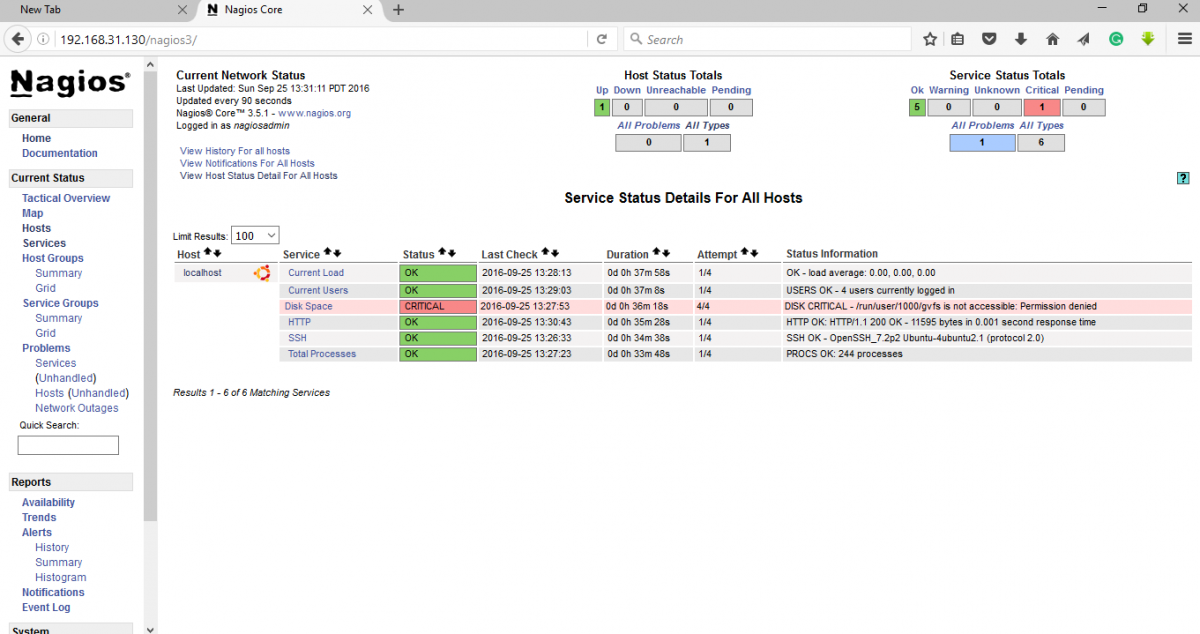
Disk Space Critical
sudo vim /etc/nagios-plugins/config/disk.cfg
add -A -i .gvfs in both the section at end of the lines and save the file.
# 'check_disk' command definition
define command{
        command_name    check_disk
        command_line    /usr/lib/nagios/plugins/check_disk -w '$ARG1$' -c '$ARG2$' -e -p '$ARG3$' -A -i .gvfs
        }

# 'check_all_disks' command definition
define command{
        command_name    check_all_disks
        command_line    /usr/lib/nagios/plugins/check_disk -w '$ARG1$' -c '$ARG2$' -e -A -i .gvfs
        }
Restart the Nagios service to effect the changes.
sudo systemctl restart nagios3
Open the browser again and now Disk Space has become critical to normal.
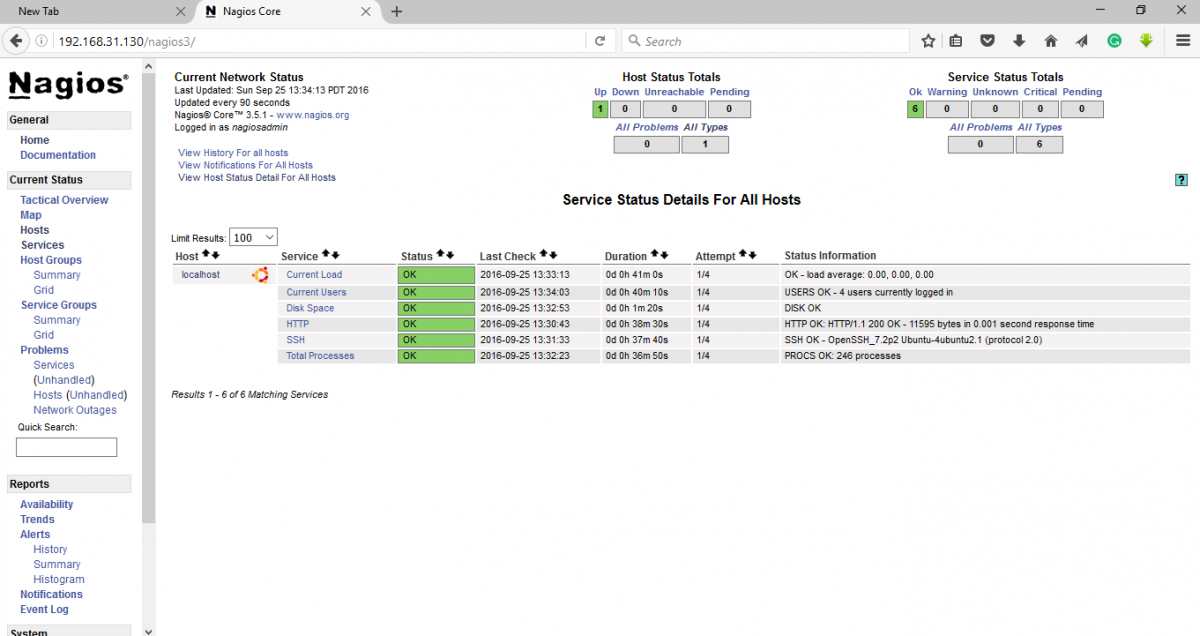
Disk Space OK
Add Monitoring targets to Nagios server
Our client IP: 192.168.31.129
Let’s add client’s ntp service on Nagios server.
vim /etc/nagios3/conf.d/tick.cfg

define host {
        host_name tick
        alias tick NTP Time Server
        address 192.168.31.129
        use generic-host
}
Save and exit from .cfg file.
Before restarting Nagios to implement changes we can test the configuration whether changes safe to go or not.
sudo nagios3 -v /etc/nagios3/nagios.cfg

Sample Output:

Total Warnings: 0
Total Errors:   0

Things look okay - No serious problems were detected during the pre-flight check
Now restart the Nagios service to effect the changes.
sudo service nagios3 restart
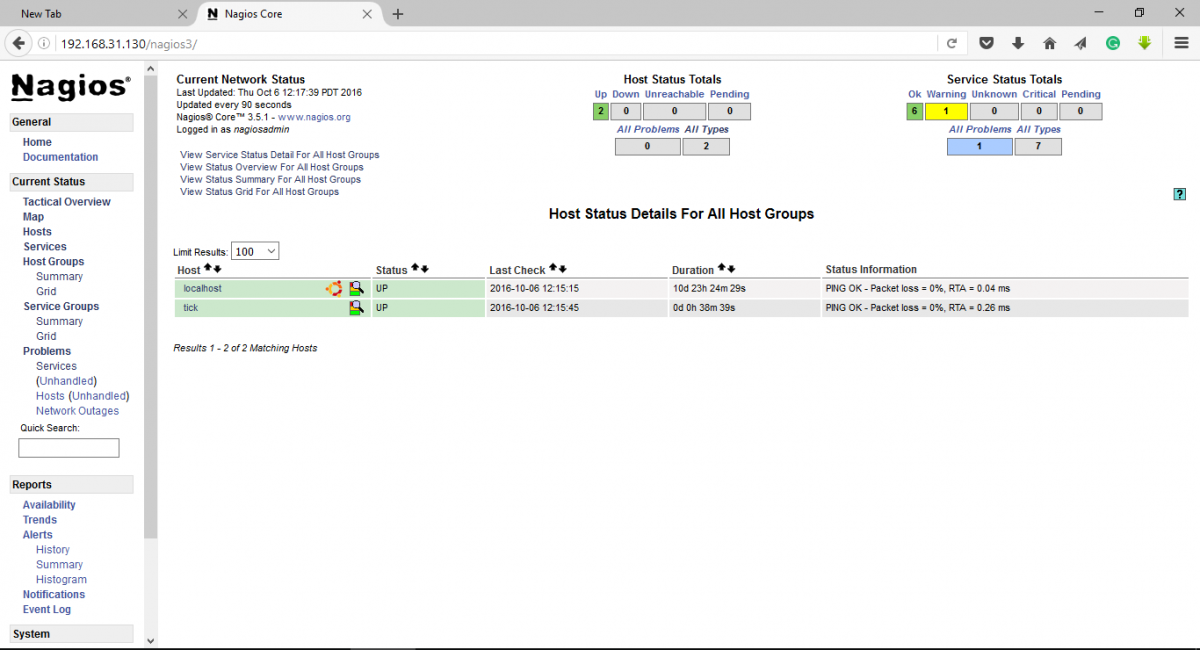
New Host Added
Define services
Nagios server needs to remove NTP restriction.
Go to the client machine and add Nagios server IP
sudo vim /etc/ntp.conf

[...]
# the administrative functions.
restrict 127.0.0.1
restrict -6 ::1
restrict 192.168.31.130 ### Added Nagios server IP
# Hosts on local network are less restricted.
[...]
Restart the NTP service.
sudo service ntpd restart
Now go back to Nagios Server and define the NTP services.
vim /etc/nagios3/conf.d/tick.cfg

define host {
        host_name tick
        alias tick NTP Time Server
        address 192.168.31.129
        use generic-host
}

define service {
        host_name tick
        service_description NTP
        check_command check_ntp
        use generic-service
}
Save and exit.
So all look ok. Now we can run pre-flight check.
sudo nagios3 -v /etc/nagios3/nagios.cfg

Sample Output:

Total Warnings: 0
Total Errors:   0

Things look okay - No serious problems were detected during the pre-flight check
Now we run plugin natively.
sudo /usr/lib/nagios/plugins/check_ntp_peer -H 192.168.31.129
Now restart the Nagios service to effect the changes.
sudo service nagios3 restart